In a busy café, takeaway, bakery, deli or quick-service restaurant, every second and every centimetre of counter space matters.
A payment-enabled customer-facing display transforms the checkout experience by allowing customers to see their order, confirm the total and complete their payment directly on the screen in front of them.
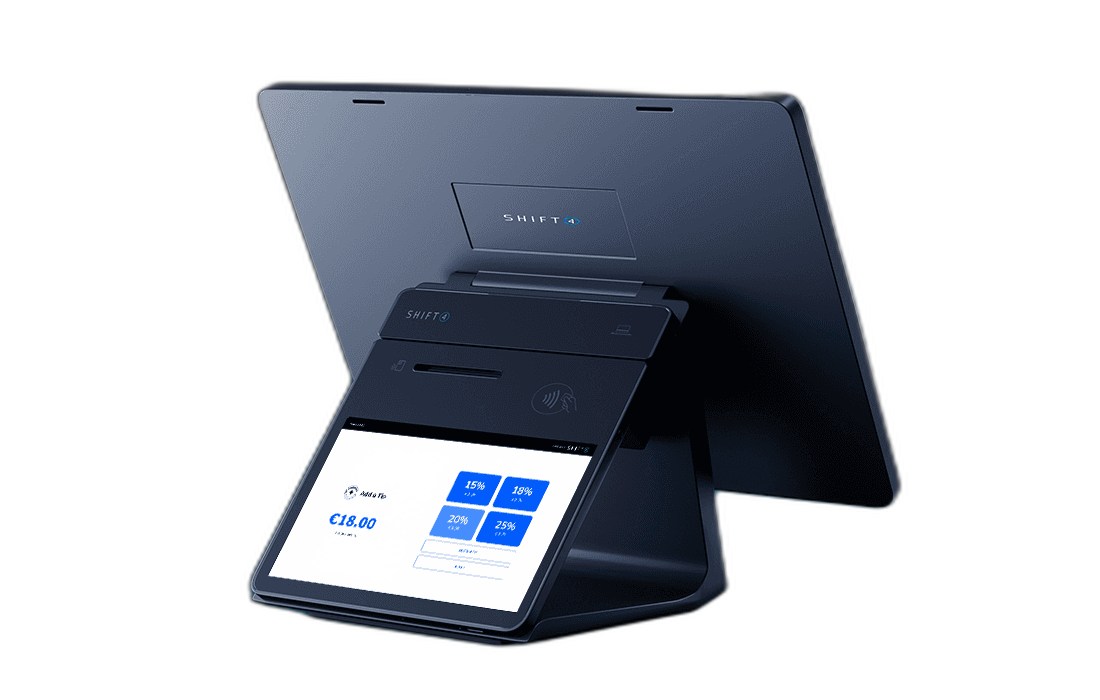
Rather than using one screen to show the order and a separate traditional PIN pad to take payment, the ithPOS customer-facing display brings order confirmation, tipping, loyalty and payment together in one connected device.
For counter-service hospitality businesses, this creates a faster, clearer and more professional experience for customers and staff.
What is a customer-facing display?
A customer-facing display is positioned on the customer's side of the counter and connected directly to the main EPOS workstation.
As the staff member adds products to the order, the customer can see the transaction update in real time.
Customers can use the display to:
- View the items being added to their order
- See prices and selected modifiers
- Check quantities
- Review discounts and surcharges
- Confirm the subtotal and final amount
- Select a tip where appropriate
- Access available loyalty features
- Pay directly through the display
The display supports popular payment methods, including contactless cards, Chip and PIN, Apple Pay and Google Pay.
Because payment functionality is built directly into the customer-facing display, there is no need to place a separate traditional PIN pad terminal beside the EPOS.
Save valuable counter space
Counter space is often limited in hospitality environments.
Cafés, takeaways, bakeries and delis may already need space for an EPOS terminal, receipt printer, cash drawer, food displays, collection equipment and other operational items.
Adding a separate PIN pad, terminal stand and additional cabling can make the checkout area feel crowded and cluttered.
A payment-enabled customer display combines two important functions in one device:
- An interactive order confirmation screen
- A secure customer payment terminal
This creates a cleaner and more compact counter setup.
Removing the need for a separate traditional PIN pad reduces the number of devices, stands and cables around the till. It also gives staff more usable workspace and helps create a checkout area that looks organised and professional.
For businesses where every centimetre of counter space matters, combining the customer screen and payment terminal can make a noticeable difference.
Position the display where the customer needs it
Not every EPOS workstation is positioned directly at the front edge of the customer counter.
In some businesses, the main EPOS may sit further back to give employees more room to work. It may be positioned beside preparation equipment, behind a raised counter or in a location that is convenient for staff but difficult for customers to reach.
The ithPOS customer-facing display can be connected using a USB cable, allowing it to extend beyond the main EPOS workstation and into the customer counter area.
This gives businesses greater flexibility when planning the layout of the checkout.
The EPOS can remain in the best position for the staff member, while the customer display can be positioned where customers can easily:
- See their order
- Review the amount
- Select a tip
- Access loyalty features
- Tap or insert their card
- Enter their PIN when required
This is particularly useful in cafés, takeaways and food-service counters where the employee and customer sides of the checkout are physically separated.
Not every customer-facing display can take payments
It is important to understand that not all customer-facing displays are payment terminals.
Many EPOS providers offer a second screen that shows order information, prices or promotional images. However, the customer may still need to pay through a separate PIN pad positioned beside the display.
For a customer-facing display to accept payments directly, it needs considerably more than an ordinary touchscreen.
The device must include the appropriate payment technology, which can include:
- A secure Chip and PIN card reader
- Contactless and NFC payment capability
- Secure PIN-entry technology
- Payment encryption and card-data protection
- Approved payment software
- Integration with the payment gateway and acquiring platform
A payment-enabled display must also meet the relevant payment security and technical standards.
This can include PCI requirements for the secure capture and protection of payment and PIN information, together with the relevant testing and approval needed for chip and contactless payments.
The complete solution may also need to be tested, approved and certified for use by the relevant payment processor or acquiring bank.
This is why an EPOS provider cannot simply add a card reader to an ordinary customer display and begin processing payments.
The hardware, payment application, security architecture and connection to the payment-processing platform all need to work together as an approved payment solution.
This additional complexity is one of the reasons payment-enabled customer displays are not supplied by every EPOS provider.
With ithPOS, the customer-facing display is designed to function as both an interactive order screen and a secure payment device, removing the need for a separate traditional countertop PIN pad.
Reduce order errors and misunderstandings
Counter-service employees often work in busy and noisy environments.
Staff may be managing queues, customised orders, product modifiers and customers changing their selections. In these conditions, it is easy for a product, quantity or option to be entered incorrectly.
A customer-facing display provides an additional layer of order verification.
Customers can see exactly what is being entered before they complete payment.
This can help identify issues such as:
- An incorrect item
- The wrong quantity
- A missing extra or modifier
- An unexpected price
- A discount that has not been applied
- An incorrect final amount
Correcting an order before payment is normally faster and easier than processing a refund or resolving a complaint afterwards.
It also gives customers greater confidence because they can clearly see what they ordered and what they are being charged.
Create a faster payment experience
With a traditional checkout setup, the employee enters the order into the EPOS and then sends or manually enters the amount into a separate card terminal.
The customer may then need to wait for the standalone PIN pad to activate before completing payment.
A payment-enabled customer-facing display makes this process more seamless.
Once the order is ready, the customer can complete payment directly on the same device they have been using to review the transaction.
There is no need for the employee to:
- Manually enter the payment amount into another terminal
- Find or move a PIN pad across the counter
- Turn a separate device towards the customer
- Reconcile an incorrectly entered payment amount
Connecting the payment directly to the EPOS transaction can help prevent keying errors and keep the checkout process moving.
During busy breakfast, lunch and evening periods, even small improvements in transaction speed can make a significant difference to queue times and customer flow.
Give customers more control
Customers increasingly expect clear and interactive technology at the checkout.
A customer-facing display allows the customer to remain involved throughout the transaction.
They can see their order, review the amount, select available options and complete payment without relying entirely on the employee to communicate the transaction details.
This creates a more transparent and modern experience.
It can also make choices such as tipping feel more private and comfortable for the customer.
Make tipping more comfortable
Where tipping is appropriate, the customer-facing display can present configurable tip options directly to the customer.
The employee does not need to verbally ask for a tip or turn a separate terminal around.
Customers can select one of the available options, enter a custom tip or continue without adding one.
This can make the tipping process feel more natural while reducing awkwardness for both the customer and the staff member.
Customise the display with your own images and logo
The ithPOS customer-facing display can be customised with the business's own logo and images.
This allows the display to reflect the identity of the café, takeaway, bakery, restaurant or other hospitality venue rather than showing a generic screen.
Businesses can add customised visual content, including:
- Company logos
- Branded background images
- Product photography
- Promotional graphics
- Seasonal campaigns
- Special offers
- New menu items
- Loyalty programme messaging
This creates a more consistent and professional brand experience at the point of sale.
When the display is not showing an active payment prompt, it can also become useful digital promotional space.
A café could use the screen to promote pastries, breakfast offers or speciality drinks. A takeaway could highlight meal deals, new menu items or seasonal promotions.
The display therefore becomes more than a payment device. It also becomes a customer communication and in-store marketing tool.
Support loyalty and repeat business
The customer-facing display can also support available customer loyalty features.
Placing loyalty options directly in front of the customer can make participation more visible and accessible.
Combined with customised branding and promotional images, the display can help businesses:
- Encourage repeat visits
- Increase loyalty participation
- Promote available rewards
- Highlight special offers
- Build stronger customer relationships
Instead of being an idle piece of payment hardware, the display becomes part of the business's wider customer engagement strategy.
Deliver a more professional checkout experience
The checkout is often the final interaction a customer has with a hospitality business.
A cluttered counter, unclear total or slow payment process can leave a poor final impression.
A modern payment-enabled customer display helps create a checkout experience that feels organised, transparent and efficient.
Customers can see what they ordered, understand what they are paying and complete the transaction using their preferred payment method.
The ability to display branded images and logos also ensures that the final stage of the customer journey remains consistent with the look and feel of the business.
For the operator, the display provides a cleaner counter, fewer separate devices and a more connected EPOS and payment process.
Ideal for counter-service hospitality businesses
A payment-enabled customer-facing display is particularly useful for:
- Cafés and coffee shops
- Takeaways
- Quick-service restaurants
- Bakeries
- Delis
- Food halls
- Hotel cafés and bars
- Ice cream shops
- Casual dining counters
- Visitor attractions
- Staff canteens
- Food trucks with fixed counter setups
Any hospitality business that takes orders and payments at a counter can benefit from making the process faster, clearer and more visually engaging.
A connected EPOS and payment experience from ithPOS
ithPOS provides hospitality businesses with modern EPOS and integrated payment technology designed to improve everyday operations.
With a payment-enabled customer-facing display, customers can review their order and pay directly on the screen in front of them.
There is no need for a separate traditional PIN pad, helping businesses save counter space and simplify the checkout area.
Where the main EPOS workstation is positioned further back, the display can be extended into the customer counter area using a USB cable. This gives businesses greater flexibility over the layout of their checkout while keeping the display and payment experience easily accessible.
Businesses can also customise the display with their own logos and images, creating a branded checkout experience and an additional channel for promoting products, offers and loyalty programmes.
Unlike an ordinary second screen, the ithPOS customer-facing display incorporates the technology needed to accept secure card and mobile-wallet payments as part of the connected EPOS transaction.
The result is a faster, clearer and more professional counter-service experience.
Upgrade your hospitality checkout
A customer-facing display is not simply an additional screen.
It is an integrated order-confirmation, payment, loyalty, branding and customer-engagement tool.
By combining order visibility and payment functionality in one device, hospitality businesses can:
- Reduce order errors
- Save valuable counter space
- Remove the need for a separate traditional PIN pad
- Improve transaction speed
- Give customers greater transparency
- Promote loyalty and special offers
- Create a cleaner and more professional checkout
Upgrade Your Counter-Service Checkout
Discover how ithPOS can combine hospitality EPOS, integrated payments and a payment-enabled customer-facing display in one connected solution.